
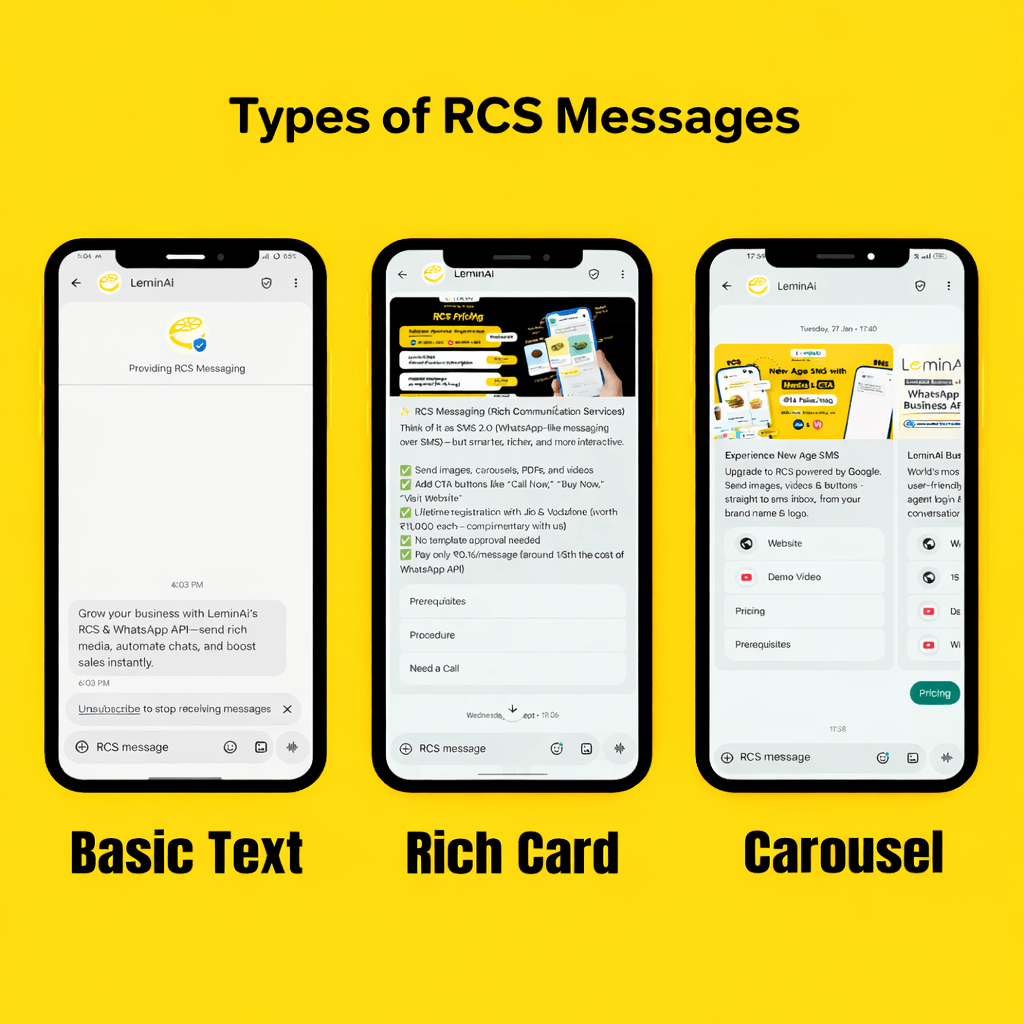
First, businesses today want better ways to talk to their customers. The different types of RCS messages help them send messages that are more colorful, clear, and interactive than normal SMS. These messages come from a verified brand name, so customers know the message is real and safe.
Businesses can work with a Google RBM Partner such as LeminAi to create branded RCS experiences and deliver interactive messages to customers through the RCS channel.
Next, RCS messages make communication more interesting. Businesses can send not only text but also images, buttons, and quick reply options. Because of this, customers can tap and respond easily. For example, they can open a website, call a business, or see a store location with just one click. Moreover, RCS messages help businesses build trust. Since the sender name is branded and verified, people feel more confident reading the message. This also reduces fake messages and confusion. As a result, customers are more likely to read and reply.
Finally, businesses adopt RCS because it improves engagement at a low cost. Different type of RCS messages can be used for alerts, promotions, and product details. In addition, these messages look modern and professional, which helps brands grow faster.
To know more about RCS Messages, Click Here
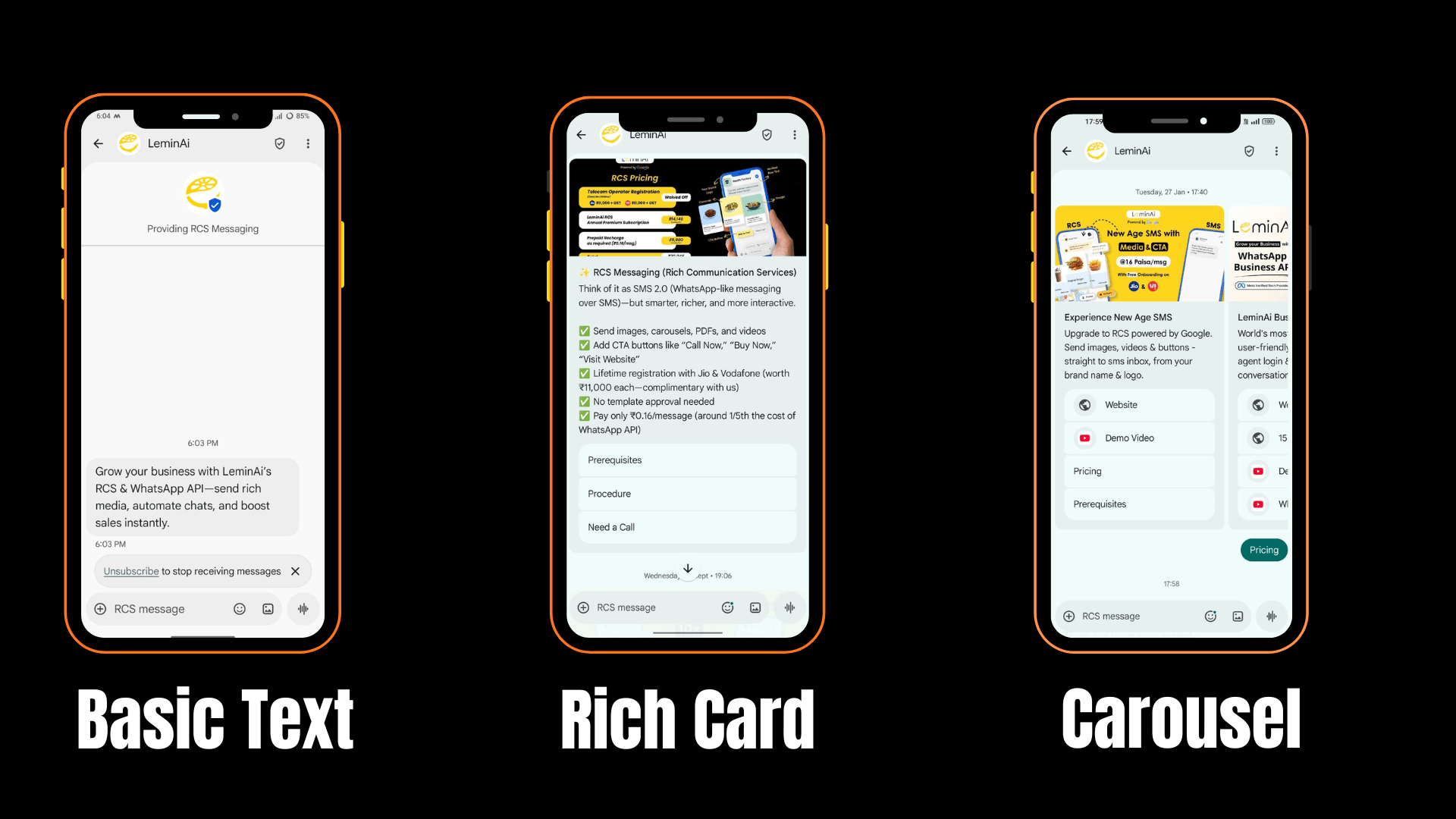
Overview of Different Types of RCS Messages
Now that we know why businesses are using RCS, let us understand the main type of RCS messages. There are three basic types of RCS messages that businesses can send to customers. Each type has different features and is used for different business needs.
First, there are Basic RCS Messages. These are simple text messages sent from a verified and branded sender. They also support quick replies and a few action buttons. Businesses mostly use them for alerts, updates, and simple communication.
Next, there are Rich Media RCS Messages. These messages are more advanced. They can include images, buttons, links, and longer text. In addition, they allow businesses to make messages more attractive and interactive for customers.
Finally, there are Carousel RCS Messages. These messages have all the features of rich media messages. However, they also allow businesses to show multiple cards in one message. For example, a business can display many products or offers in a single message.
In short, the three main types of RCS messages are:
- Basic Text
- Rich Media Messages
- Carousel Messages
1. Basic Text Messages
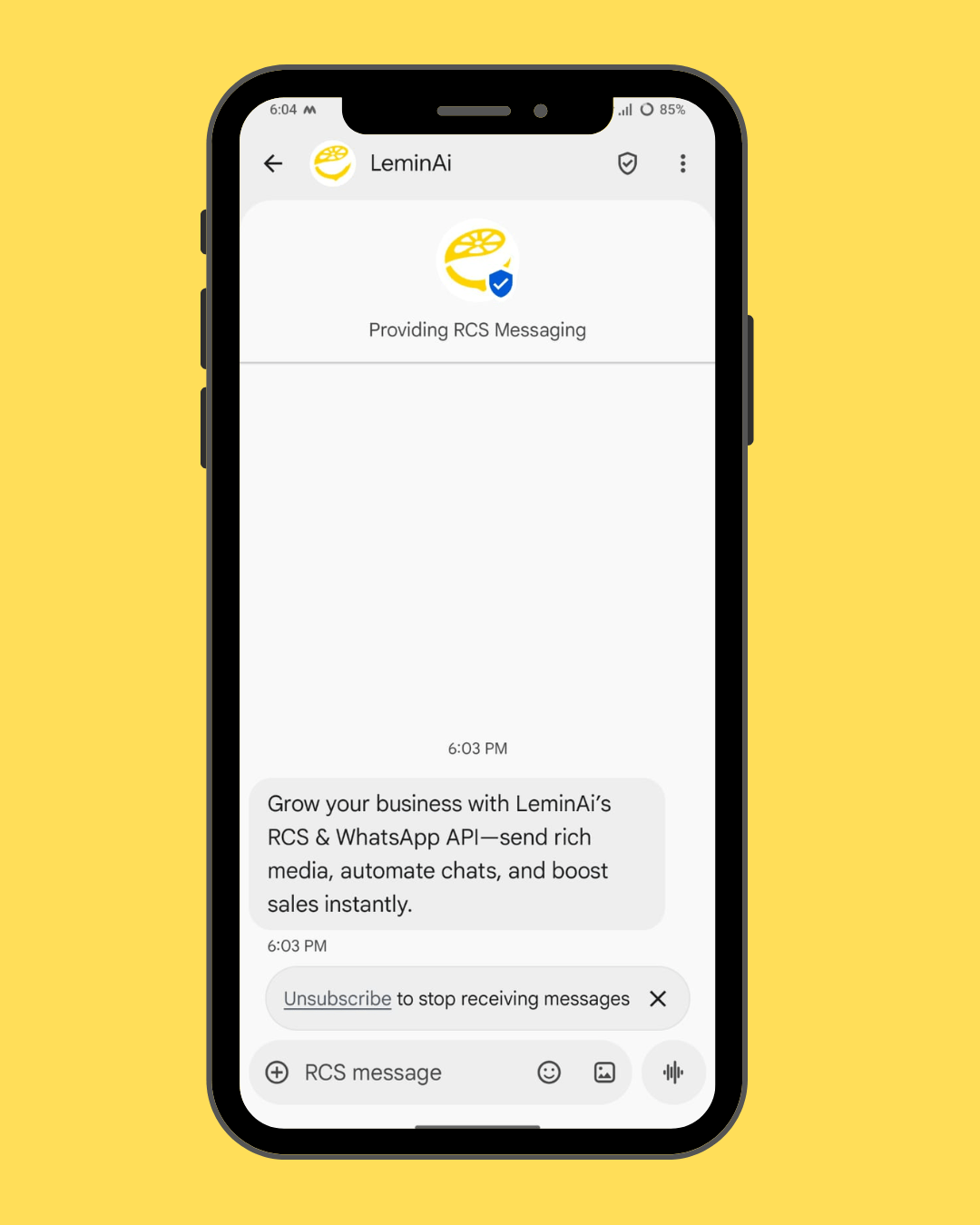
First, let us understand what Basic RCS Messages are. These are simple text-based messages sent from a verified and branded business name. This means customers can clearly see who is sending the message. Because of this, Basic RCS Messages look more trusted than normal SMS.
Next, these messages focus on clear and easy communication. They mainly contain text and quick response options. Businesses use this type of RCS message when they want to send short and important information to customers.
Features of Basic Text Messages
Basic RCS Messages come with the following features:
- Messages are sent from a verified, branded sender
- Text-only messages for simple communication
- Up to 4 Suggested replies (quick reply options)
- Easy for customers to read and respond
Moreover, these messages help customers take action quickly, such as replying to a question or opening a link.
Pricing of Basic Text Messages
The cost of Basic RCS Messages is very affordable.
- Price: 12 paise per message
This means businesses only pay a small amount for each message they send to customers. Because the cost is low, companies can send thousands of messages every day without spending too much money.
In addition, this pricing is suitable for businesses that send regular updates like alerts and notifications. It helps them save money while still using a modern and trusted messaging system. Therefore, Basic RCS Messages are a smart choice for daily business communication.
Best Use Cases for Basic Text Messages
Basic RCS Messages are best used for simple and important business messages such as:
OTP messages
These messages help customers verify their identity quickly and safely. They are short and need fast delivery.
Account alerts
Businesses can inform customers about login activity, balance updates, or security alerts in a clear way.
Payment updates
These messages tell customers when a payment is received or failed. This builds trust and avoids confusion.
Order confirmations
Customers get instant confirmation after placing an order. This helps them feel sure that their order was successful.
Simple customer notifications
Businesses can send reminders, service updates, or appointment messages easily using this type of RCS message.
In summary, Basic RCS Messages are best for fast, low-cost, and important information that customers need to read quickly.
2. Rich Media RCS Messages
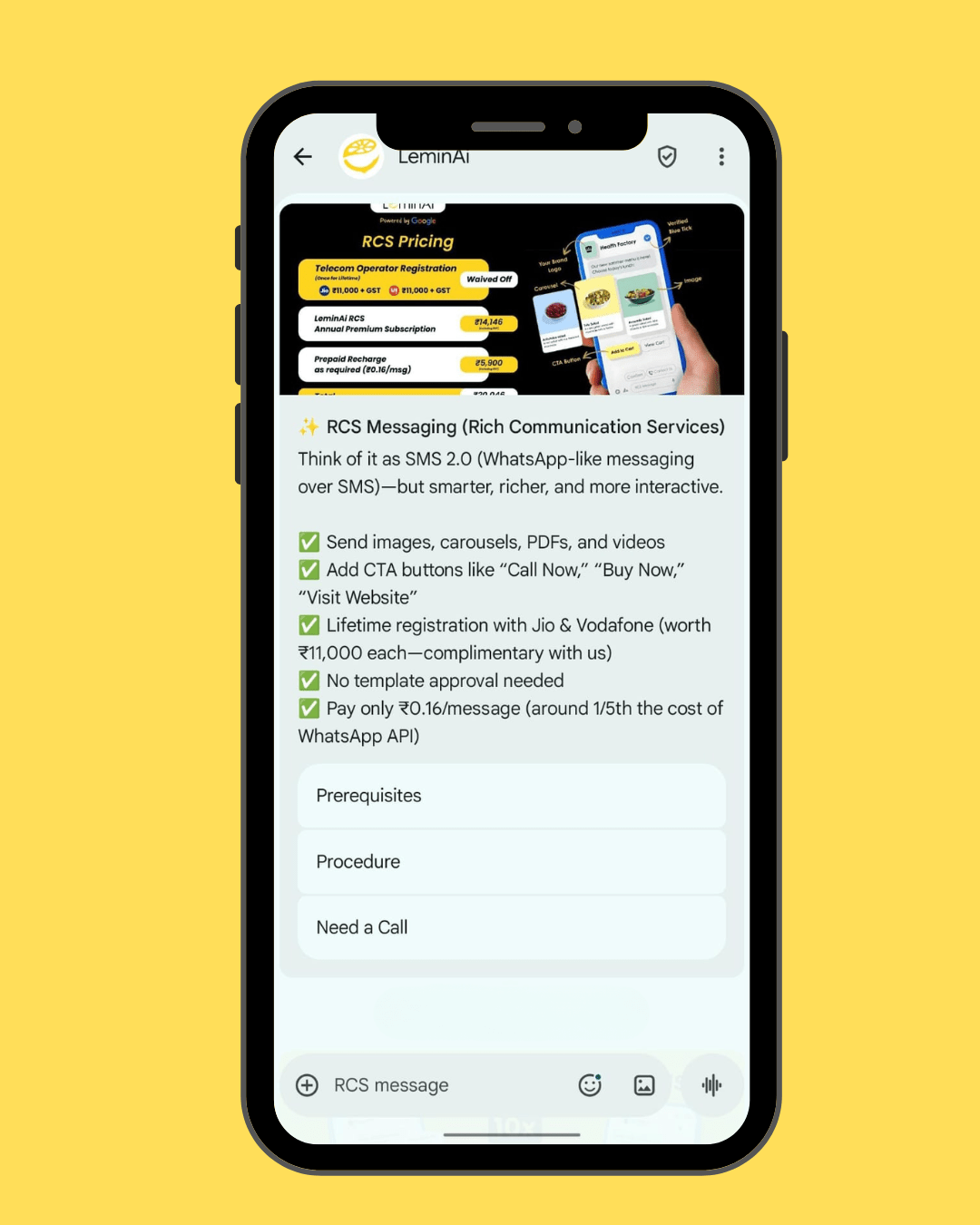
Now, let us move to the second type of RCS message, which is Rich Media RCS Messages. These messages are more advanced than Basic RCS Messages. They are also sent from a verified and branded business name, but they include more content like images, buttons, and links.
Next, Rich Media RCS Messages help businesses share more information in a single message. They can send longer text, show pictures of products, and add action buttons. Because of this, customers can understand the message better and take action easily.
Features of Rich Media RCS Messages
Rich Media RCS Messages come with many powerful features:
- Messages are sent from a verified, branded sender
- Messages can be more than 160 characters long
- Suggested replies and suggested actions are available
- Multimedia elements such as images, videos, GIFs, URL, buttons, and rich cards can be added
Moreover, these features make the message more attractive and interactive. Customers do not just read the message, they can also click and respond.
Pricing of Rich Media RCS Messages
The cost of Rich Media Messages is affordable.
- Price: 16 paise per message
The price of Rich Media RCS Messages is 16 paise per message. This price is slightly higher than Basic RCS Messages because these messages include images, buttons, and rich content.
In addition, businesses get more value for this price because they can share detailed information and improve customer engagement. Even at 16 paise per message, Rich Media RCS Messages are still affordable for marketing and customer communication. Therefore, many businesses choose this type when they want better results from their campaigns.
Best Use Cases for Rich Media RCS Messages
Rich Media RCS Messages are best used for:
Promotional messages
Businesses can send offers, discounts, and festival deals with images and buttons. This makes promotions more attractive and easy to understand.
Product launches
Companies can introduce new products with pictures and links. Customers can learn about the product without opening another app.
Marketing campaigns
These messages help businesses run creative campaigns with rich content. As a result, customers feel more interested and engaged.
Customer engagement messages
Businesses can ask questions, share updates, and guide customers using buttons and quick replies. This improves communication and response rate.
In short, Rich Media RCS Messages are ideal for businesses that want to send detailed, colorful, and interactive messages to their customers.
3. Carousel RCS Messages
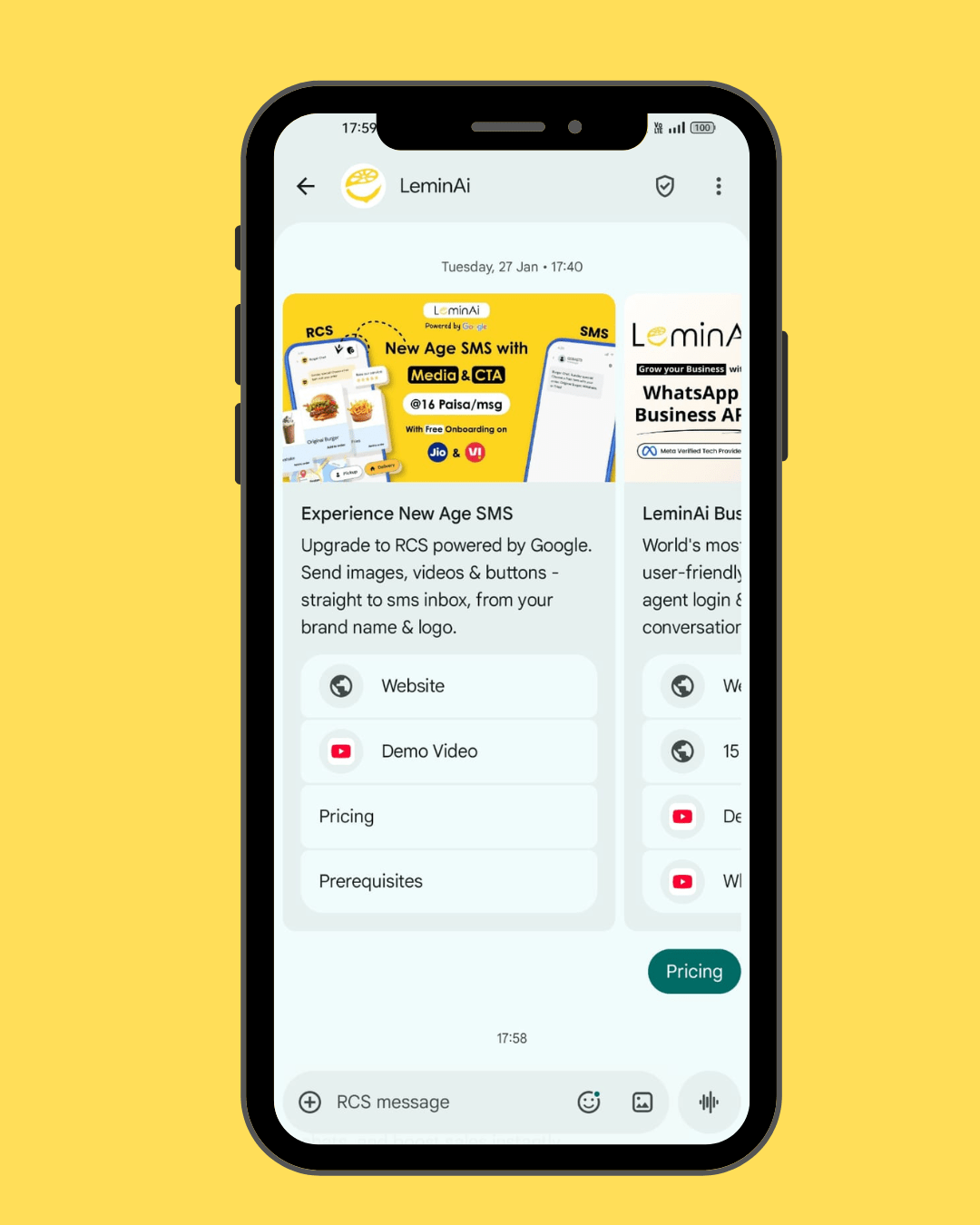
Now, let us look at the third and most advanced type of RCS messages, called Carousel RCS Messages. These messages include all the features of Rich Media RCS Messages. However, they also allow businesses to show multiple cards in one single message.
Next, Carousel RCS Messages help businesses present more information in a clean and organized way. Each card in the carousel can have its own image, text, and buttons. Customers can swipe left or right to see different cards. Because of this, they can explore many products or offers inside one message.
Features of Carousel RCS Messages
Carousel RCS Messages come with the following features:
- Messages are sent from a verified, branded sender
- All features of Rich Media RCS Messages are included
- Support for up to 10 carousel cards in one message
- Each card can have images, videos, text, and action buttons
- Suggested replies and suggested actions are available
Moreover, these features make Carousel RCS Messages very powerful for product display and marketing.
Pricing of Carousel RCS Messages
The cost of Carousel Messages is affordable.
- Price: 16 paise per message
The price of Carousel RCS Messages is 16 paise per message. Even though these messages include many cards and rich content, the cost is the same as Rich Media RCS Messages.
This makes Carousel RCS Messages a cost-effective option for businesses that want to show multiple products or offers in one message. In addition, businesses can save money because they do not need to send many separate messages to display different items.
Understanding Suggested Actions (Rich Card Buttons)
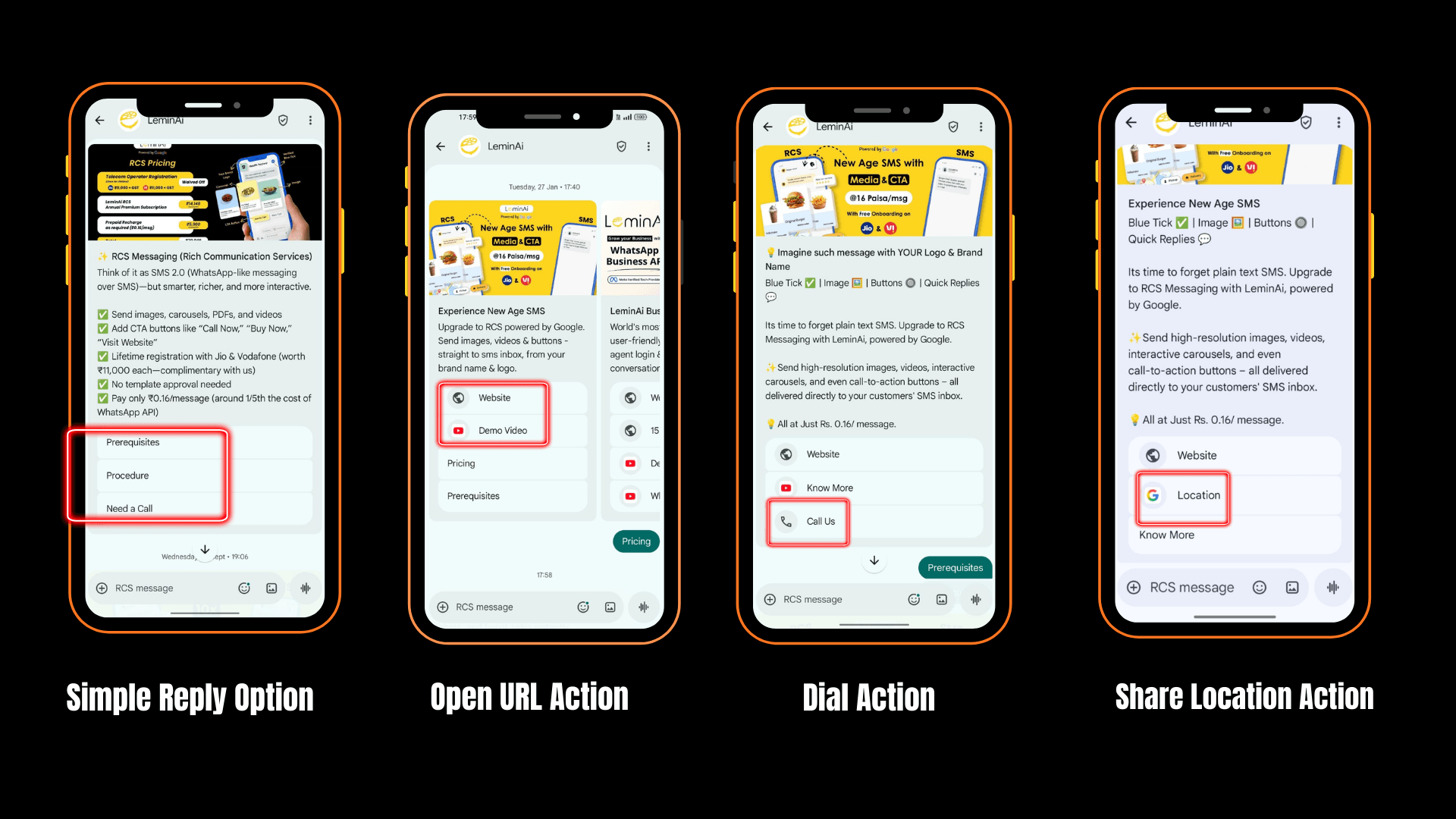
Now, let us understand Suggested Actions, also called Rich Card Buttons. These buttons help customers take action directly from the message. Suggested Actions are available only in Rich Media RCS Messages and Carousel RCS Messages.
First, Suggested Actions make messages more interactive. Instead of only reading a message, customers can tap a button to visit a website, make a call, or find a location. Because of this, businesses can guide customers easily without making them type anything.
Suggested Actions are buttons that appear inside the RCS message. These buttons tell customers what to do next. For example, a button may say “Visit Website” or “Call Now.” When the customer taps the button, the action happens immediately.
In addition, these buttons help reduce confusion. Customers do not need to search for links or phone numbers. Everything is already placed clearly inside the message.
Features of Suggested Actions
Suggested Actions come with the following features:
Simple Reply Option
The Simple Reply option allows customers to respond to a message with just one tap. These replies are short and can be up to 20 characters long. For example, buttons like “Interested” or “Not Interested” help customers share their choice quickly.
This option is very useful because customers do not need to type anything. They only tap a button and send their response. This saves time and makes communication faster and easier.
Open URL Action
The Open URL action allows customers to open a website or link directly from the message. This link can be a business website, product page, or social media page.
When customers tap this button, they are taken to the correct page without searching on the internet. This makes the process simple and smooth. Customers get more information about an offer or service in just one click.
Dial Action
The Dial Action, also called Call Now, allows customers to call the business with just one tap. They do not need to copy or type the phone number manually.
This feature is very helpful for customer support and sales teams. Customers can talk to a real person when they need help or more information. It is also useful when customers want quick answers about products or services.
Share Location Action
The Share Location action shows the location of a store or office on a map. Customers can see the address and directions clearly.
This feature is very useful for businesses that have physical stores, branches, or service centers. Customers can find the place easily without asking for directions again and again.
Understanding Suggested Replies (Quick Replies)
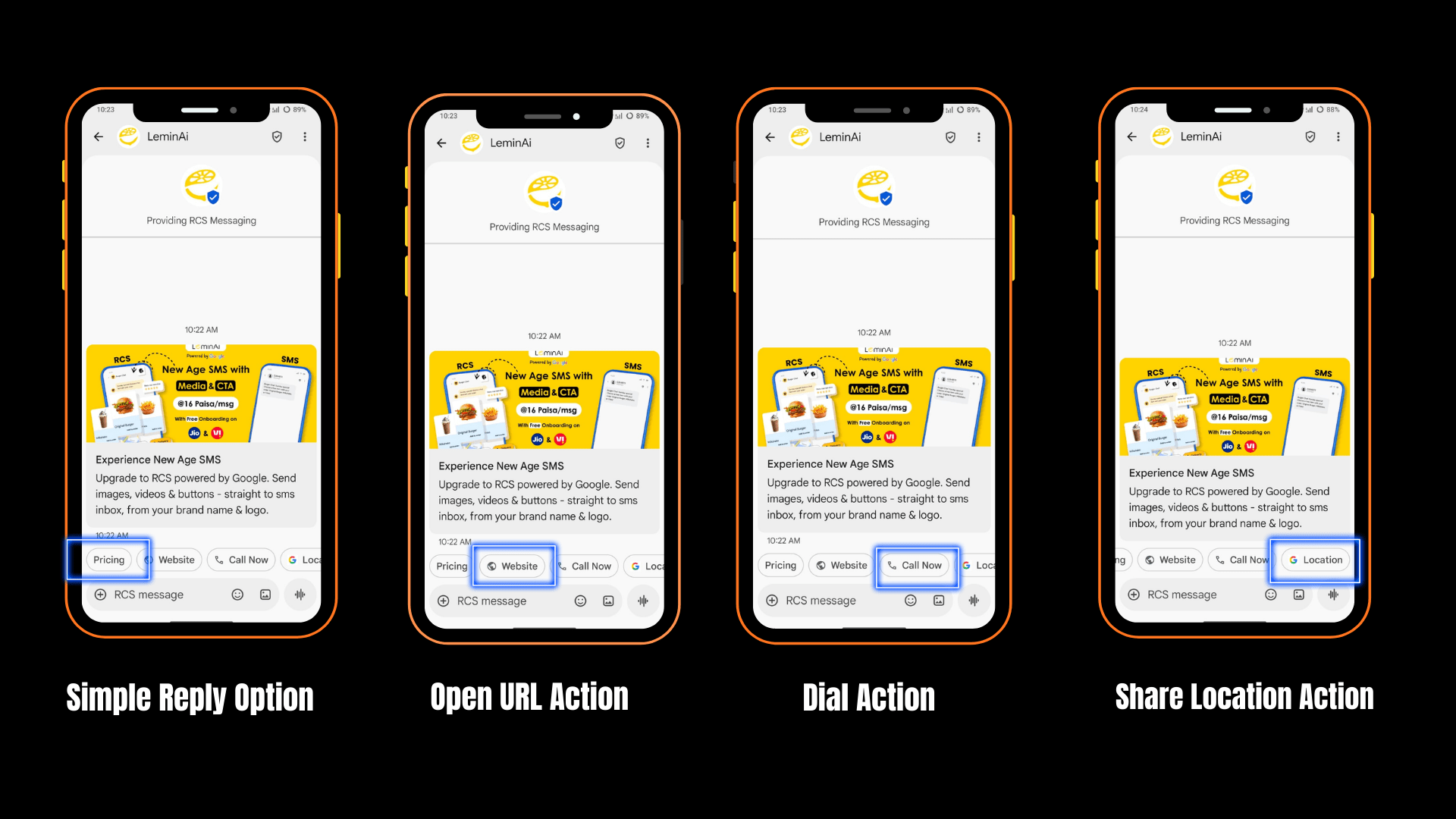
Now, let us understand Suggested Replies, also called Quick Replies. These replies help customers respond to a message easily with just one tap. Suggested Replies are available in Basic RCS Messages, Rich Media RCS Messages, and Carousel RCS Messages.
First, Suggested Replies make communication faster. Instead of typing a message, customers can choose a reply that is already shown to them. Because of this, businesses get quick responses and can continue the conversation smoothly.
Suggested Replies are small reply options that appear at the end of the message content. These replies guide customers on how they can respond. For example, a customer can tap a reply instead of writing a full message.
In addition, Suggested Replies help reduce mistakes. Customers do not need to think about what to type. They only need to select one option that best matches their choice.
Features of Suggested Replies
Suggested Replies come with the following features:
Simple Reply Option
The Simple Reply option allows customers to send a short response with one tap. The reply text can be up to 20 characters long.
For example, customers can choose replies like “Interested” or “Not Interested.” This makes communication fast and clear.
In addition, this option helps businesses understand customer choices quickly. It is very useful for surveys, offers, and feedback messages.
Open URL Option
The Open URL option allows customers to open a website or link directly from the message.
This link can be a business website, product page, or social media page.
Because of this, customers can get more information without searching on the internet. It also helps businesses bring customers to their online platforms easily.
Dial Action Option
The Dial Action option lets customers call the business with just one tap.
They do not need to copy or type the phone number.
This option is very helpful for customer support and sales teams. Customers can talk to the business quickly when they need help or more details.
Share Location Option
The Share Location option shows the location of a store or office on the map.
Customers can see the address and directions easily.
This is useful for businesses that have physical stores or service centers. It helps customers find the place without any confusion.
Benefits of Using Different Types of RCS Messages
Using different types of RCS messages helps businesses communicate in a better and smarter way. These messages are not only text-based but also rich, interactive, and branded. Because of this, customers enjoy reading and responding to them.
First, RCS messages improve customer engagement. With images, buttons, and quick replies, customers can easily interact with the message. This makes communication more interesting and reduces the chance of messages being ignored.
Next, RCS messages help build trust. Since messages come from a verified and branded sender name, customers feel safe opening them. This reduces fake messages and increases brand credibility. Moreover, RCS messages make communication faster and easier. Customers do not need to type long replies. They can simply tap a button or choose a quick reply. This saves time for both customers and businesses.
In addition, different types of RCS messages support many business needs. Businesses can use them for alerts, promotions, product display, and customer support. This flexibility makes RCS messaging useful for many industries. Finally, RCS messages are cost-effective. Even with rich content and interactive features, the pricing remains affordable. Businesses can reach more customers without spending too much money.
Getting Started with RCS Messaging with LeminAi
Now that we understand the different type of RCS messages, let us see how businesses can get started with RCS messaging.
Getting started with RCS messaging is easy if you follow a few simple steps. These steps help you move from setup to sending your first RCS campaign without confusion.
Choose LeminAi as your RCS service provider.
First, visit the LeminAi platform. LeminAi is a Google RBM Partner, helping businesses get started with trusted and interactive RCS messaging in India. There is no onboarding fee and no setup cost to get started.
There is no onboarding fee and no setup cost to get started.
As LeminAi provides:
- Easy dashboard to send messages
- Support for images, buttons, and carousels
- Message delivery and click tracking
- Clear and affordable pricing
- Fast setup in India
This makes it easy for businesses to start RCS messaging without technical work.
Step 2: Register Your Brand and Sender
- Submit your KYC documents and business details (such as GST, company proof, and brand logo).
- These documents are sent for telecom operator verification.
- After approval, your RCS service becomes live within about 1 week.
Step 3: Create Your RCS Message
Now, design your RCS message. Choose the message type you want to send, such as a single card or a carousel.
Then:
- Add images or banners
- Write a short and clear message
- Add buttons like “Buy Now,” “View Product,” or “Call Support”
- Always preview the message before sending it to make sure everything looks good.
Step 4: Send Your First Campaign
Finally, send your first RCS campaign.
- First, choose your audience, such as all customers or a specific group.
- Next, choose when to send the message (now or later).
- Then, send a test message to check for mistakes.
After that, launch your campaign and track results like message views and button clicks. This helps you improve your next campaign.
👉 To get started with RCS Messages, click Here
Conclusion
In this blog, we learned about the different type of RCS messages and how they help businesses communicate better with customers. We discussed three main types of RCS messages: Basic RCS Messages, Rich Media RCS Messages, and Carousel RCS Messages. Each type has its own features, pricing, and best use cases.
First, Basic RCS Messages are best for simple and important updates like OTPs and alerts. Next, Rich Media RCS Messages are useful for sharing images, links, and detailed information. Finally, Carousel RCS Messages are perfect for showing many products or offers in one message.
We also understood the role of Suggested Actions and Suggested Replies. These features make messages more interactive and easy for customers to use. With buttons and quick replies, customers can respond faster and take action without typing long messages.
Moreover, getting started with RCS messaging is simple. Businesses only need to choose the right type of message and create clear content. Over time, they can improve their messages based on customer responses.
In conclusion, using the right type of RCS messages helps businesses build trust, improve engagement, and grow through smart communication. RCS messaging is a modern and powerful way to connect with customers in today’s digital world.
What is the cost of RCS messages?
The cost depends on the message type:
- Basic RCS Messages: 12 paise per message
- Rich Media RCS Messages: 16 paise per message
- Carousel RCS Messages: 16 paise per message
LeminAi makes RCS messaging affordable for businesses.
Which RCS message type supports carousel cards?
Only Carousel RCS Messages support multiple cards in one message. Businesses can add up to 10 cards to show many products or offers.
Can small businesses use RCS messaging?
Yes. With free onboarding, no platform fees, zero setup cost, easy APIs and no minimum volume commitments, LeminAi makes Rich Communication Services accessible to startups and small businesses.
Is RCS messaging safe for customers?
Yes, RCS messages are sent from a verified and branded sender name. This helps customers know the message is real and builds trust.