Send 10 RCS messages at the cost of just 4 WhatsApp messages

RCS (Rich Communication Services) is the modern upgrade to SMS. It delivers rich media, interactive buttons, suggested replies, read receipts and branded sender information inside a user’s native messaging app. RCS works natively on all phones, so users do not need a separate app to receive rich messages.
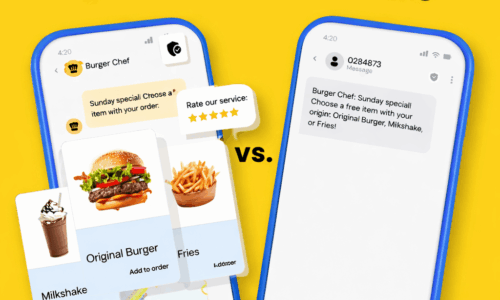
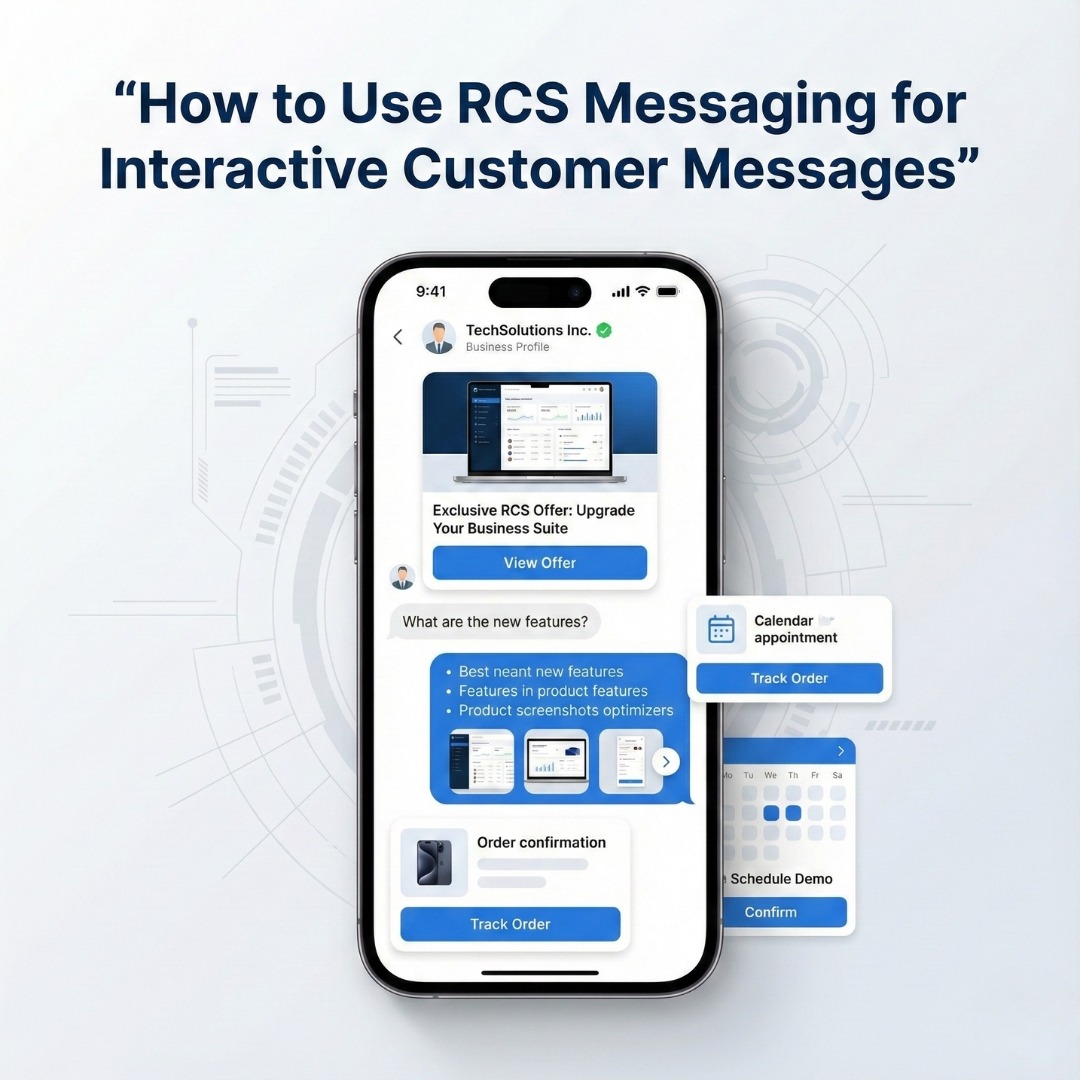
RCS gives businesses richer tools than SMS—such as high-resolution images, carousels, quick-reply buttons, and verification badges—so brands can send interactive, conversion-focused messages (order cards, booking confirmations, appointment reminders, promotional carousels) that users can act on immediately. These features drive higher engagement and better click-through rates than plain SMS.
Telecoms and vendors now position RCS as a native, trusted channel that complements WhatsApp rather than replaces it. RCS shows up in the default Messages app, gives brands a verified presence, and works well for all audiences and scenarios where rich, branded messaging matters.
Why Businesses Should Use RCS Messaging?
(Benefits & Key Use Cases)
RCS messaging gives businesses the power of rich, interactive chat without asking customers to download any new app. Since RCS works inside the default Messages app, users trust it more and engage with it naturally. As a result, brands see higher open rates, better click-through rates, and stronger conversions compared to SMS.
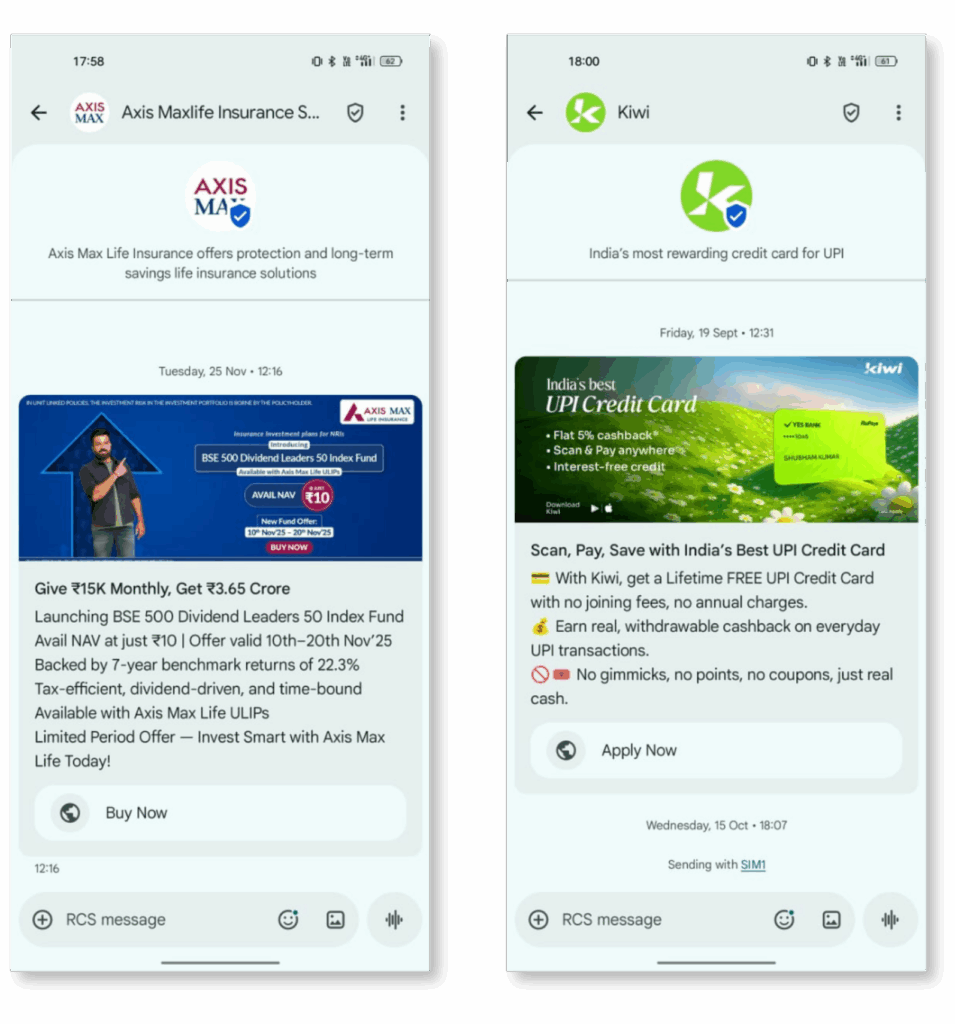
One of the biggest benefits of RCS is brand verification. Each RCS message shows your brand name, logo, and verified badge. This reduces fraud risk and increases customer trust. Therefore, customers feel safer clicking buttons, viewing product cards, or completing actions inside the message itself.
Another major advantage is interactivity. Unlike SMS, RCS supports:
- Rich images and videos
- Carousel product cards
- Quick-reply buttons
- Suggested actions (Call, Buy, Track, Book)
- Read receipts
Because of this, RCS turns a simple message into a mini customer journey. Users can browse, select, and act without leaving the chat. This directly improves engagement and shortens the sales cycle.
From a cost and performance angle, RCS often delivers a better ROI than both SMS and WhatsApp API for certain use cases, especially notifications, reminders, and promotional campaigns. Several industry benchmarks show that RCS campaigns consistently achieve higher interaction rates than SMS because of its visual and interactive nature.
Key Business Use Cases for RCS Messaging
Businesses across industries now use RCS for both marketing and operations. The most common high-impact use cases include:
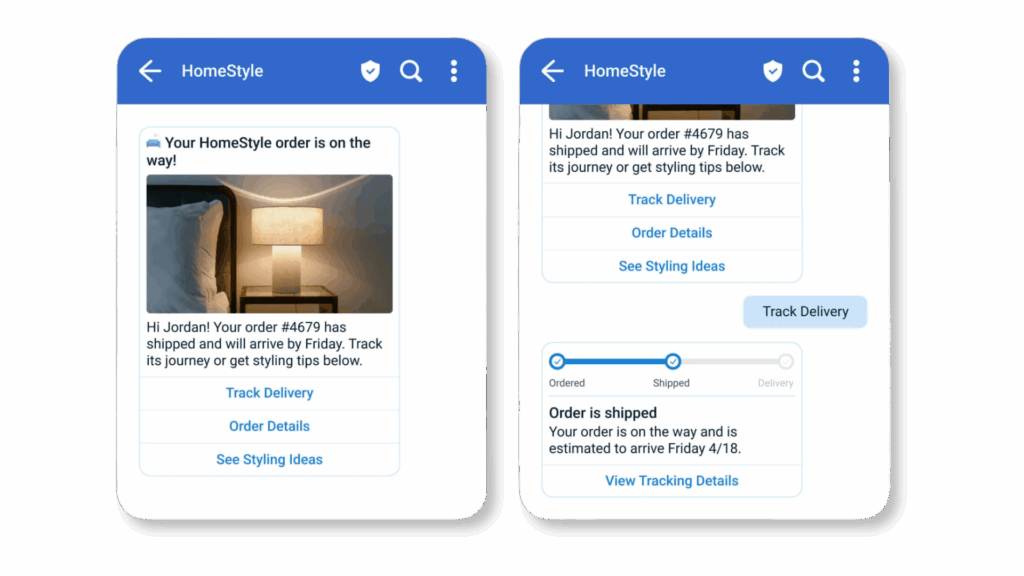
1. Order Updates & Delivery Tracking
E-commerce brands send interactive order cards with:
- Product image
- Order status
- “Track Order” button
- Customer support action
This improves transparency and reduces support tickets because customers get everything inside one message.
2. Promotional Campaigns & Offers
Brands run RCS campaigns with:
- Banner images
- Offer carousels
- “Buy Now” buttons
- Limited-time CTAs
These campaigns perform better than SMS because users can visually explore the offer before clicking.
3. Appointment Reminders & Bookings
Hospitals, salons, and service businesses use RCS to:
- Send appointment reminders
- Allow users to confirm or reschedule via buttons
- Reduce no-shows automatically
This improves operational efficiency and customer experience at the same time.
4. Banking, Payments & Alerts
Banks and fintech companies use RCS for:
- Transaction alerts
- Payment confirmations
- KYC updates
- Fraud warnings
The verified sender identity improves trust for sensitive notifications.
In short, RCS helps businesses move from plain-text alerts to fully interactive customer conversations. It combines the reach of SMS with the experience of modern chat apps, which is why adoption continues to grow rapidly across retail, healthcare, logistics, and finance.
RCS vs SMS vs WhatsApp: A Practical Comparison for Businesses
Businesses often ask a simple question: “Which channel should I use for customer messaging—SMS, WhatsApp, or RCS?” The real answer depends on cost, ease of setup, message volume, target audiences and customer experience. While each channel has its place, RCS clearly stands out when you need interactive messaging at scale without high costs.
Let’s compare all three from a real business point of view.
1. SMS: Maximum Reach, Minimum Experience
SMS is available on every mobile phone and works without the internet. Because of this, it remains the safest choice for basic alerts. However, it offers the least engagement.
What SMS does well:
- Works on all phones (smart + feature phones)
- No internet required
- Easy to set up (same day activation)
- Good for OTPs and simple alerts
- Supports very high message volume
Where SMS falls short:
- Only plain text
- No images, buttons, or branding
- No verified brand profile
- Very low engagement for promotions
- No real interaction tracking
Cost & Setup Factors:
- Setup time: Same day to 1 day
- Cost: Low per message
- Message quantity: Very high (no major limits)
- Best use: OTPs, basic alerts, system notifications
Therefore, SMS works for reach, but not for engagement.
2. WhatsApp: High Engagement, Higher Cost & Controls
WhatsApp feels personal and familiar. That is why it delivers high open and reply rates. However, the official API adds cost, approvals, and strict rules.
What WhatsApp does well:
- Rich images, videos, documents
- Two-way personal conversations
- High open and response rates
- Great for customer support and sales chat
Where WhatsApp creates friction:
- You must use pre-approved templates for outbound messages
- Per-conversation pricing increases monthly costs
- Setup requires business verification and BSP onboarding
- Strict rules on promotional messaging
- Scaling becomes expensive very quickly
Cost & Setup Factors:
- Setup time: 3–10 days (sometimes longer due to approvals)
- Cost: High (conversation-based pricing + BSP markup)
- Message quantity: Restricted by tier & rules
- Best use: Customer support, high-value sales conversations
So, WhatsApp works well for support-heavy communication, but it becomes costly for bulk campaigns.
3. RCS: Best Balance of Cost, Scale & Engagement
RCS combines the reach of SMS with the experience of WhatsApp. It runs directly inside the Messages app and supports rich content without forcing users to install any extra app.
What makes RCS powerful:
- Rich images, videos, and carousels
- Quick-reply and action buttons
- Verified business profile with logo
- Read receipts and engagement tracking
Where RCS wins for businesses:
- Much cheaper than WhatsApp for bulk campaigns
- Far more interactive than SMS
- No template approval delays in most use cases
- Ideal for promotions, updates, and reminders at scale
Cost & Setup Factors:
- Setup time: 1–3 days (brand verification + sender approval)
- Cost: Low to medium, far cheaper than WhatsApp API
- Message quantity: High-volume friendly
- Best use: Marketing campaigns, order updates, reminders, promotions
RCS gives you high engagement without high WhatsApp-style pricing.
SMS vs WhatsApp vs RCS
Choose the right messaging channel for your business
| 📊 Factor | 💬 SMS | 🚀 RCS NEW | |
|---|---|---|---|
| App Required | ✓ No |
✗ Yes
(WhatsApp)
|
✓ No
(Native Messages)
|
| Internet Required | ✓ No | ✗ Yes | Yes |
| Rich Media Support | ✗ No | ✓ Yes | ✓ Yes |
| Buttons & Interactions | ✗ No | ✓ Yes | ✓ Yes |
| Verified Brand Profile | ✗ No |
~ Limited
(Green Tick)
|
✓ Yes |
| Bulk Marketing | ✓ Yes | ⚠ Restricted | ✓ Yes |
| Setup Time |
Same day
|
3–10 days
|
1–3 days
|
| Cost Per Campaign | 💰 Low | 💰💰💰 High | 💰💰 Low–Medium |
| High Message Volume | ✓ Yes | ~ Limited by tiers | ✓ Yes |
| Best Use Case |
OTPs, simple alerts |
Support, sales chats |
Marketing, updates, promos |
What This Means for Your Business
- If your goal is basic alerts at scale, SMS is enough.
- If your goal is personal sales or customer support, WhatsApp is useful.
- However, if your goal is interactive campaigns, rich promotions, reminders, and bulk updates at low cost, then RCS is the smartest choice.
That is why most growing businesses now follow a multi-channel strategy:
- SMS for OTPs
- WhatsApp for support
- RCS for marketing and rich notifications
This mix gives you the best reach, best engagement, and best control over cost.
How to Use RCS Messaging Step by Step (From Setup to First Campaign)
Getting started with RCS messaging looks technical from the outside, but you can break it into a few clear steps. If you follow these in order, you move from “just reading about RCS” to “sending your first rich campaign” without feeling lost.
Step 1: Choose an RCS Service Provider
The first and most important step in using RCS messaging is choosing the right RCS service provider. You cannot send RCS messages directly from a normal mobile number. You need a platform that connects your business with telecom operators and manages brand verification, message delivery, analytics, and billing.
When selecting an RCS provider, always look for:
- Easy web-based dashboard (no technical setup)
- Support for rich cards, images, buttons, and carousels
- Real-time delivery, views, and click tracking
- Transparent pay-as-you-go pricing
- Fast onboarding in India
- Direct connectivity with Indian telecom operators
This is where LeminAI becomes a very strong choice for small and medium businesses.
Why Choose LeminAI for RCS Messaging
LeminAI offers one of the most business-friendly RCS setups in India right now. It focuses on low cost, fast onboarding, and simple operations—exactly what small businesses need.
Key Benefits:
🎉 Free onboarding on Jio & Vi RCS networks
Currently, LeminAI provides free onboarding for businesses sending RCS through Jio and Vi, the two telecom companies actively offering RCS services in India.
💰 No monthly subscription fees
You do not pay any fixed monthly or yearly subscription. There are no platform charges.
📊 Pay only for what you use
You simply recharge message credits. As long as you have balance, you can send RCS campaigns.
✓ Verified brand messaging
Your business gets a verified sender profile with brand name and logo, which increases trust and engagement.
🎨 Rich & interactive messaging support
You can send:
📈 Analytics & performance tracking
You can track:
🇮🇳 Designed for Indian businesses
Fast approvals, rupee billing, and support aligned with Indian telecom rules.
Step 2: Register Your Brand and Sender
After choosing your RCS service provider, the next step is to register your business brand and sender profile. This step is mandatory because RCS only works with verified business identities. Once approved, your customers will see your brand name and logo on every message instead of a random number.
You need to submit your basic business details such as your business name, website, category, support email, and contact number. After that, you upload your brand logo and choose the display name you want customers to see.
For verification, you may need to provide documents like a GST certificate, company registration proof, or PAN details. Once submitted, telecom operators like Jio and Vi review your profile. This approval usually takes 1 to 3 working days.
After approval, your sender becomes officially RCS verified, which increases trust and improves message engagement.
Step 3: Design Your RCS Message (Cards, Media, Buttons)
Now you create the actual RCS message that your customers will see. This is the most important step because RCS allows you to use rich visuals and interactive elements.
First, choose the type of layout you want to use. You can send a single image card, a carousel with multiple product cards, or a simple text with media combination. Then upload your product images, offer banners, or brand creatives. Clear and attractive visuals always perform better.
Next, write a short and clear message. Use a strong headline, followed by one or two lines explaining the offer or update. Your message should focus on one clear goal—either to inform, remind, or sell.
After the text, add action buttons such as Buy Now, View Product, Track Order, Call Support, or Get Offer. These buttons make your message interactive and help customers take action instantly.
Before saving the message, always preview it on a test device. Check whether the images load correctly, the text is readable, and the buttons redirect properly. Once everything looks good, save your RCS message.
Step 4: Launch Your First Campaign
Once your brand is verified and your RCS message is ready, you can launch your first campaign.
Start by selecting your target audience. You can send messages to all customers, only recent buyers, new leads, location-based users, or any custom segment you have created. Good targeting improves results and keeps your cost under control.
Next, choose when you want to send the campaign. You can send it immediately, schedule it for a specific date and time, or trigger it based on a customer action such as order placement or cart abandonment.
Before sending to everyone, always send a test message to your own number or your team. This final check helps you catch any mistakes in images, links, or buttons.
After testing, go live with your campaign. Messages will start delivering to users through the RCS network in real time. Once delivery begins, monitor key performance data like message views, button clicks, and conversions such as orders or inquiries. These insights will help you improve your future RCS campaigns.
RCS Messaging Setup
Launch your rich communication service in 4 simple steps
Choose RCS Provider
Pick a platform like LeminAI that connects you to Jio & Vi and gives you a simple dashboard to manage everything.
Register Brand & Sender
Add your business name, logo and documents so your RCS profile gets verified and trusted by customers.
Design Rich RCS Message
Create beautiful cards with images, text and interactive buttons like "Buy now" or "Track order".
Launch & Track Campaign
Send to your target list, then monitor views, clicks and conversions inside your analytics dashboard.
Best Use Cases of RCS Messaging for Small Businesses
RCS works best when you use it for messages that need both attention and action. Instead of plain text like SMS or expensive templates on WhatsApp, RCS lets you send rich, clickable content that feels like a mini landing page inside the customer’s inbox.
Here are some of the most powerful use cases for small businesses:
1. Promotional Offers and Flash Sales
RCS is perfect for promotions where you want customers to see the offer, not just read it.
You can send:
- A banner image with the discount
- Short text like “Flat 30% Off – Today Only”
- A “Shop Now” button that opens your website or app
This works very well for:
- D2C brands
- Fashion stores
- Food delivery
- Local shops running festival or weekend offers
Because the message looks visual and clickable, response rates are much higher than SMS.
2. Order Updates and Tracking
Instead of sending a plain text like “Your order has been shipped,” RCS lets you send:
- Product image
- Order status (Packed / Shipped / Out for Delivery)
- Expected delivery date
- A “Track Order” button
Customers get all the details in one rich card. This reduces “Where is my order?” messages and improves trust in your brand.
3. Abandoned Cart Reminders
If you run an online store, abandoned carts hurt revenue. With RCS, you can send:
- An image of the product left in the cart
- A short message like “You left this behind”
- A “Complete Purchase” button
- Optional extra: a small discount or free shipping
This kind of visual reminder nudges users back to the checkout page and increases conversions.
4. Appointment Reminders and Confirmations
For clinics, salons, gyms, and coaching centers, RCS works very well for appointment flows.
You can send:
- Appointment date and time
- Location or Google Maps link
- Buttons like “Confirm”, “Reschedule”, or “Call Support”
Customers don’t have to type anything. They just tap a button, and your system updates their status. This reduces no-shows and missed bookings.
5. Feedback and Rating Requests
After a service or purchase, you can send an RCS message asking for quick feedback.
For example:
- “How was your experience?”
- 3–5 rating buttons (⭐ to ⭐⭐⭐⭐⭐)
- Optional comment link
Because the experience feels smooth and visual, more people respond compared to boring survey links.
6. New Product Launches and Catalog Showcases
You can use RCS carousels to show multiple products in one message:
- Each card shows an image, name, price
- Each card has a “View” or “Buy” button
This feels like a mini catalog inside the chat and works beautifully for:
- Fashion
- Electronics
- Lifestyle brands
7. Recovery and Re-engagement Campaigns
For inactive customers, RCS helps you bring them back with:
- A personalised greeting
- A special comeback offer
- A “Unlock Offer” button
This kind of rich, interactive message usually performs better than plain SMS or email reactivation campaigns.
You can run all these use cases from one place when you use a platform like LeminAI, which lets you design rich RCS cards, add buttons, choose your audience, and send campaigns without any complex setup.
RCS Messaging Cost & ROI (Why It’s Cheaper Than WhatsApp API)
When businesses compare messaging channels, cost quickly becomes the deciding factor. While WhatsApp delivers great engagement, its per-conversation pricing model makes large-scale campaigns expensive. On the other hand, RCS messaging offers high engagement at a much lower cost, which makes it ideal for promotions, reminders, and bulk customer communication.
Why WhatsApp API Becomes Expensive at Scale?
With WhatsApp API, you pay based on conversation categories such as marketing, utility, authentication, and service. Each outbound message opens a paid conversation window. As your message volume grows, your monthly bill rises quickly. In addition, you often pay extra markup to a BSP (Business Solution Provider).
So even if one message feels cheap, running daily campaigns for:
- Offers
- Order updates
- Reminders
- Feedback
can push costs very high for small and medium businesses.
How RCS Keeps Messaging Costs Low
RCS pricing works more like bulk messaging with rich features, not per-conversation windows. You pay per message, not per chat session. There are no strict marketing window limits like WhatsApp. This makes it predictable and easier to budget.
More importantly, RCS gives you:
- Images
- Buttons
- Carousels
- Verified brand identity
at a cost that stays much closer to SMS than to WhatsApp.
Real Cost Advantage: RCS vs WhatsApp API
Your Reach Increases By
2x - 2.5xwith the same budget!
ROI Impact for Small Businesses
Lower cost alone is not enough. What matters is return on investment (ROI). RCS improves ROI in three key ways:
- Higher engagement than SMS
Since RCS supports rich visuals and buttons, customers are more likely to tap and act. - Lower spend than WhatsApp API
You reach more users without paying for every conversation window. - Faster conversion cycles
Customers can browse, click, and act inside the message itself. This shortens the customer journey and improves conversion rates.
For example:
- A WhatsApp campaign might reach 4,000 users with ₹4,000.
- The same budget can reach nearly 10,000 users with RCS.
- Even if only 2–3% convert, RCS often generates more total sales because of higher reach.
Is RCS Messaging Safe & Verified?
Yes, RCS messaging is both safe and verified when sent through an official RCS service provider. In fact, security and brand trust are two of the biggest reasons why many businesses now prefer RCS over SMS for customer communication.
Verified Business Identity
Before any business can send RCS messages, it must go through a brand verification process. This means:
- Your business name is reviewed
- Your logo is checked
- Your website and business documents are verified
- The telecom network approves your sender profile
Only after this approval does your brand become live on RCS. Once verified, customers see your official business name and logo instead of a random mobile number. This instantly builds trust and reduces the risk of fraud or fake messages.
Protection Against Spam and Fraud
Unlike SMS, where anyone can send bulk messages easily, RCS operates on a permission-based model. This helps in:
- Blocking fake senders
- Reducing phishing attempts
- Preventing brand impersonation
- Protecting customers from spam
Because messages come only from verified brands, users feel safer opening and interacting with them.
Customer Control and Opt-Out Options
RCS also respects user choice. Customers can:
- Block a brand
- Mute messages
- Opt out of campaigns
This ensures that customers stay in control of what they receive, which helps businesses maintain a clean and compliant messaging list.
RCS is a secure, telecom-approved, and verified messaging channel built specifically for trusted business communication. It combines strong brand verification, network-level security, and customer control, making it far safer and more reliable than traditional SMS for rich business messaging.
Conclusion
Customer communication has moved far beyond plain SMS. Today, businesses need messaging that is rich, interactive, trusted, and cost-effective—and that is exactly what RCS delivers. It combines the wide reach of telecom messaging with the engaging experience of modern chat apps. From promotions and reminders to order updates and re-engagement campaigns, RCS gives you better visibility, higher interaction, and stronger ROI than traditional channels.
More importantly, when you compare RCS with WhatsApp API, the cost advantage becomes very clear. With RCS, you can send nearly 10 rich messages at the cost of just 4 WhatsApp API messages. That means more reach, more clicks, and more conversions without increasing your budget. For small and medium businesses, this difference can directly impact monthly profits and long-term growth.
If you are serious about improving customer engagement while keeping your messaging costs under control, now is the right time to adopt RCS.
If you want higher engagement than SMS, lower cost than WhatsApp API, and better trust with verified branding, RCS is the channel you should invest in—and LeminAI gives you one of the easiest and most affordable ways to do it in India.
👉 Recharge, sign up, and start your first RCS campaign with LeminAi today.
Frequently Asked Questions About RCS Messaging
What is RCS messaging in simple words?
RCS (Rich Communication Services) is the modern upgrade to SMS. It allows businesses to send rich messages with images, buttons, carousels and verified branding inside the phone's default Messages app.
Is RCS better than SMS for business marketing?
Yes. RCS is far better than SMS because it supports rich visuals, clickable buttons and verified branding, which leads to higher engagement and conversions.
Is RCS cheaper than WhatsApp Business API?
Yes. In most cases, businesses can send nearly 10 RCS messages at the cost of about 4 WhatsApp API messages, which greatly improves ROI for bulk campaigns.
Do customers need to install any app for RCS?
No. RCS works inside the default Messages app, so customers do not need to install any extra application.
Is RCS messaging safe and verified?
Yes. RCS uses verified business profiles with approved brand names and logos. This reduces spam, fraud, and brand impersonation.
Which telecom networks support RCS in India?
Jio and Vi currently support RCS business messaging in India, and coverage is expanding as more networks enable it.
How can small businesses start using RCS?
Businesses can buy RCS credits, sign up on the RCS portal, complete brand verification and then start sending campaigns.
Can RCS replace WhatsApp for business messaging?
RCS does not fully replace WhatsApp. WhatsApp works best for support chats, while RCS is ideal for bulk promotions and rich notifications.